What goes in your document
- Job details
- Your company, the client or principal contractor, site address, dates, hours and scope.
- Risk assessment
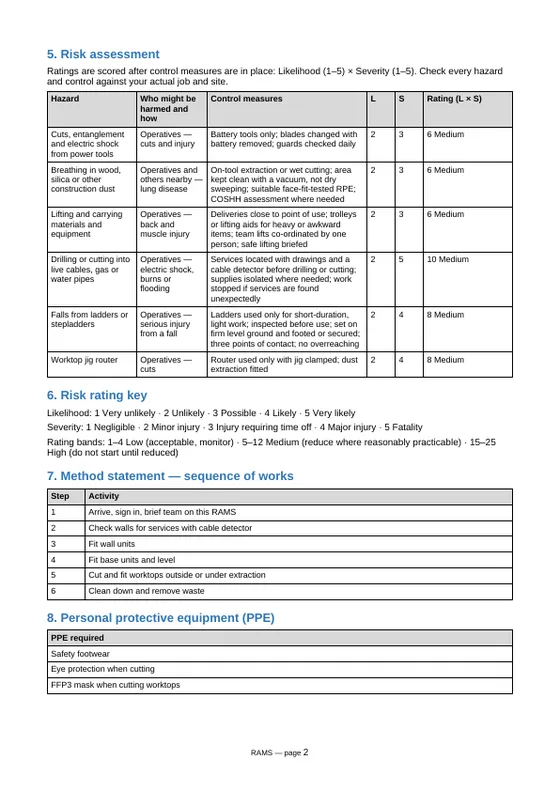
- Each hazard you tick, who it affects, the controls and a 5 × 5 risk score.
- Method statement
- Your job as numbered steps, in the order the work happens.
- People and training
- Who is on the job, their role and the cards they hold.
- PPE, plant and tools
- What is worn and what is used, with references for inspected kit.
- Emergency arrangements
- First aiders, first aid kit, nearest A&E, fire assembly point and an emergency contact.
- Briefing sign-off
- A sheet for everyone on the job to sign once they have been briefed.
- Yours to change
- A normal .docx file. Open it in Word, Google Docs or Pages if the job changes.
Start your RAMS
Work through the sections in order. There is nothing to pay until the last step, and you can load the example to see how a finished one reads.
Before you start
Can I change the document after I download it?
Yes. It is a normal Word file (.docx). Open it in Word, Google Docs or Pages and edit anything, for example if the dates or the team change.
Who checks that the hazards and controls are right?
You do. The suggested controls are a starting point written for common site work. The RAMS is only right for your job once you have checked every hazard and control against the job and the site, and you tick a box to confirm that before you pay.
What if a hazard on my job isn't on the list?
Use "Add your own hazard" in step 4. Write the hazard, who could be harmed and the controls, then score it like the others.
Do I need an account?
No. You pay £19 by card on Stripe and the Word file downloads on this page as soon as you come back.
What if the download doesn't start?
Press "Download again" on the message that appears. If that doesn't work, email hello@complysimple.co.uk with the time you paid.